A WRITTEN TEARDOWN
How always-on bots actually work
Sarah Simionescu opened up Grok Bot, Muse, Instinct, OpenClaw, and the rest, then pulled out the pieces you can steal. This is that talk, in the same frames.

Sarah Simionescu
Product engineering, Composio · Nov 23, 2026 · 7-minute talk

She is clear about the bias. She leads product engineering at Composio, the video is not sponsored, and she still recommends Composio when the alternative is standing up OAuth apps yourself. The rest of the stack she names the same way: as parts, not as a pitch.
The frames below are cropped from the left side of the video, where the diagrams live. She stays on camera the whole time. What follows is the argument, not a transcript.
01
Who she opened up
The core of every one of these bots is an LLM. What differs is the harness around it: how context is managed, which tools the model is handed, how you reach it, and whether it ever speaks first.

OPEN SOURCE
- OpenClaw — community
- Hermes — Nous Research
- OpenBot — CopilotKit
- TrustClaw — Composio
CLOSED SOURCE
- Poke — Interaction Co.
- Grok Bot — xAI
- Muse — Meta
- Duet — Anthropic
- Dots — OpenAI
- Instinct — Spear Street
02
Chat is just a loop that stops
Take the model's output and prepend it to the next prompt. That is chat. Everything you put into the model is context. In her diagram, a Tokyo itinerary comes back, the user says "make it cheaper," and the previous turns are already sitting in the window when the model answers.

03
An agent is that loop, plus a hack
Don't answer immediately. Feed the output back in and let the model decide whether to continue. When it wants to stop, it emits a token you can detect. On the slide the Tokyo plan comes back as three days, and the last line in the window is <end_turn>.

The model still cannot send an email. So the loop cheats. In its output the model names a function and the arguments. Your harness parses that, runs the tool, and pushes the result back in as another message. The model then chooses: call a tool, write text, or end the turn.
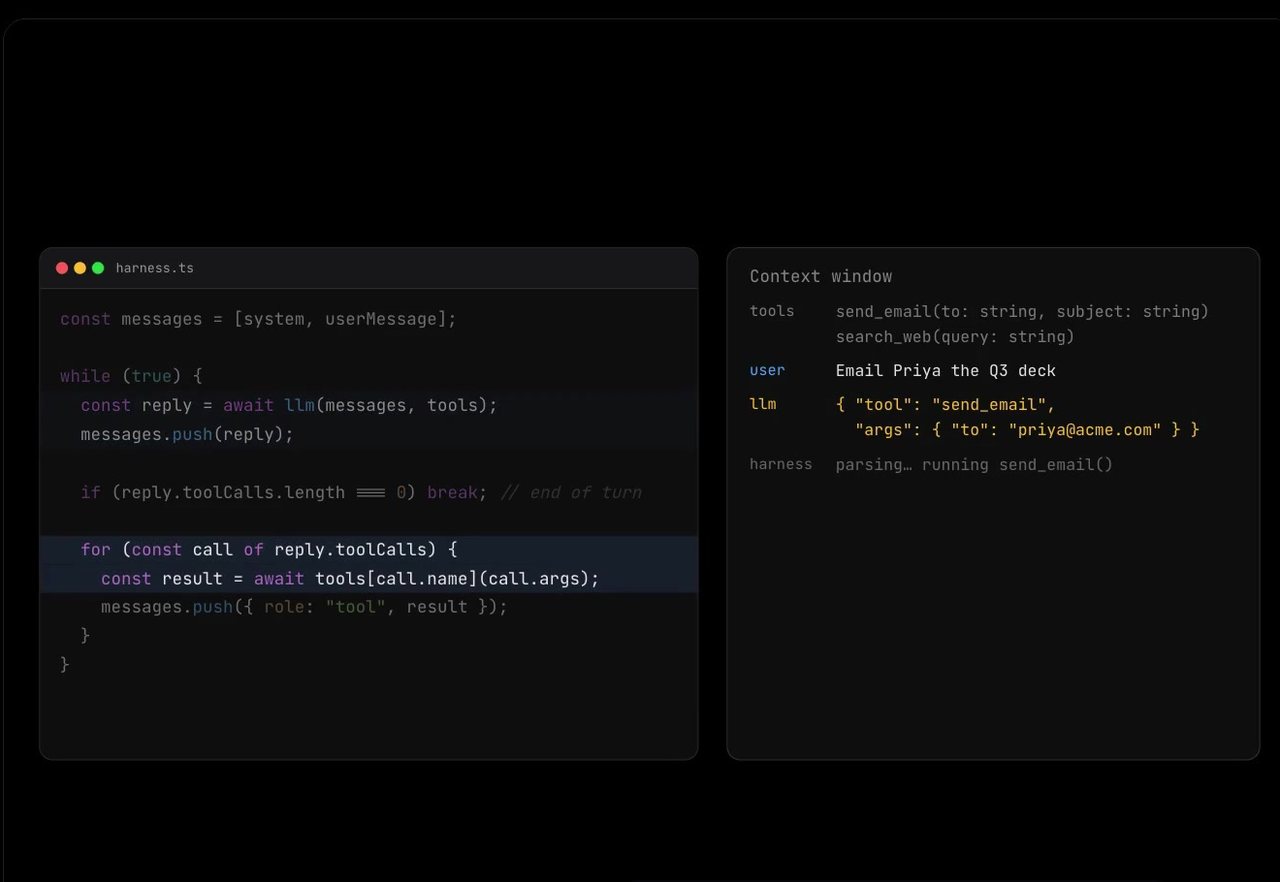
const messages = [system, userMessage];

while (true) {
  const reply = await llm(messages, tools);
  messages.push(reply);

  if (reply.toolCalls.length === 0) break; // end of turn

  for (const call of reply.toolCalls) {
    const result = await tools[call.name](call.args);
    messages.push({ role: "tool", result });
  }
}
On the right of the same slide, the window for "Email Priya the Q3 deck" holds two tool schemas, send_email and search_web, and the model answers with { tool: "send_email", args: { to: "[email protected]" } }.

The context plus the tools is typically what we call the harness.
Inside the tool box she lists five ways out of the loop: a terminal, a browser, an API, MCP, and a CLI. The rest of the talk is which of those to actually give it.
04
Give it a computer
The obvious first tool is a terminal. Through it, the agent can do almost anything you can do on a machine. That machine can be the user's computer, or a sandbox you spin up. At Composio, internal agents run on E2B and exe.dev.

The terminal in the frame runs something as ordinary as cd dashboard && pnpm test and gets 214 passed back. That is the point. Once the agent has a shell, "tools" stop being a list you curate and start being whatever the machine can already do.
05
A browser, unless there is an API
The next option is a browser. Browserbase or Browser Use will spin up a headless one. Chrome DevTools MCP will hand the agent the browser you are already signed into. In the frame, Muse clicks through a fake CRM until it lands on Luis Ortega, a new lead.

She then draws the cost. A browser has to boot, load, look, click, look, type, look, and click again before it finally makes the request. An API, MCP server, or CLI makes the request immediately. If an API exists for the action, give the agent that.

The popular bots don't pick one. Most of them use a machine, a browser, and an API together. Doing all three well is the annoying part, mostly because of auth.
06
1,700 apps, without stuffing the window
There are two ways into most APIs. Paste a key, which is what the Linear box on the left asks for. Or run OAuth, which feels better and costs you a developer app: client id, client secret, access token, refresh token. Some apps charge, or make you wait for approval, before anyone but you can connect.

Her recommendation, stated as such, is Composio. Out of the box it exposes on the order of 1,700 apps. It has already registered the developer apps, it holds the tokens, and it holds the API keys so a user never pastes one into the chat. She says the free tier covers over a hundred thousand tool calls a month.

Then the obvious objection: tens of thousands of tool schemas will not fit in a context window. The slide shows what happens if you try. The window fills with Gmail, Slack, GitHub, Linear, Drive, and Jira signatures, and a red bar says the window is full before the user has said anything useful.

The fix on the next slide is two meta-tools. First the agent calls COMPOSIO_SEARCH_TOOLS("send an email") and gets back GMAIL_SEND_EMAIL with its arguments. Then it calls COMPOSIO_MULTI_EXECUTE_TOOL. The catalog stays outside the window. Only the tool it is about to use comes in.

07
How you actually talk to it
She calls these channels, and she regrets not shipping iMessage on a bot she built herself. Photon Spectrum and Linq are SDKs that hide the messy part. The thread in the frame is the whole product: "what's on my calendar tomorrow," a three-line answer, "move the dentist to Friday," done.

If you would rather have a web UI, don't build the chat from scratch. A good chat product is a lot of small behavior: threads, tool traces, a pending action, a composer that doesn't feel homemade. She would start with CopilotKit. The localhost frame is that UI, mid-task, with send_email: sent already in the transcript.

Most of the bots she looked at offer several channels into the same agent. Two of them, Poke and Instinct, don't offer a web app at all. Texting is the default. That is what makes the thing feel like its own entity instead of a tab.

The same matrix, in type you can read on a phone.
OpenClaw
- Its own app
- Default
- Terminal
- Default
- Texting
- Available
- Chat apps
- Available
- Voice
- Available
- Not offered
Hermes
- Its own app
- Default
- Terminal
- Default
- Texting
- Available
- Chat apps
- Available
- Voice
- Available
- Available
OpenBot
- Its own app
- Default
- Terminal
- Not offered
- Texting
- Available
- Chat apps
- Available
- Voice
- Available
- Not offered
TrustClaw
- Its own app
- Default
- Terminal
- Not offered
- Texting
- Not offered
- Chat apps
- Available
- Voice
- Not offered
- Not offered
Poke
No web app. Texting is the product.
- Its own app
- Not offered
- Terminal
- Not offered
- Texting
- Default
- Chat apps
- Available
- Voice
- Default
- Not offered
Grok Bot
- Its own app
- Default
- Terminal
- Not offered
- Texting
- Not offered
- Chat apps
- Available
- Voice
- Default
- Available
Muse
- Its own app
- Default
- Terminal
- Not offered
- Texting
- Not offered
- Chat apps
- Available
- Voice
- Default
- Available
Duet
- Its own app
- Default
- Terminal
- Not offered
- Texting
- Not offered
- Chat apps
- Not offered
- Voice
- Default
- Not offered
Dots
- Its own app
- Default
- Terminal
- Not offered
- Texting
- Available
- Chat apps
- Available
- Voice
- Default
- Not offered
Instinct
No web app. Texting is the product.
- Its own app
- Not offered
- Terminal
- Not offered
- Texting
- Default
- Chat apps
- Available
- Voice
- Default
- Available
| Bot | Its own app | Terminal | Texting | Chat apps | Voice | |
|---|---|---|---|---|---|---|
| OpenClaw | Default | Default | Available | Available | Available | Not offered |
| Hermes | Default | Default | Available | Available | Available | Available |
| OpenBot | Default | Not offered | Available | Available | Available | Not offered |
| TrustClaw | Default | Not offered | Not offered | Available | Not offered | Not offered |
| Poke | Not offered | Not offered | Default | Available | Default | Not offered |
| Grok Bot | Default | Not offered | Not offered | Available | Default | Available |
| Muse | Default | Not offered | Not offered | Available | Default | Available |
| Duet | Default | Not offered | Not offered | Not offered | Default | Not offered |
| Dots | Default | Not offered | Available | Available | Default | Not offered |
| Instinct | Not offered | Not offered | Default | Available | Default | Available |
08
Memory, and the 3 a.m. dream
Memory is the secretive part. On the closed bots she could not see the implementation, but the shape repeats. Some context is included on every turn. A separate set of tools lets the agent go look something up when that isn't enough.
Under that, three layers:
- Where it is stored. Files, or a database.
- How it is searched. Keywords, or vectors.
- What sits on top. Dreaming. Graphs.

Then she opens OpenClaw, because you can actually read it. Four markdown files are loaded into context at the start of every session. Daily notes are not.


Daily notes are a raw log. They are not in the window. The agent has to use the terminal and search them. The command on the slide is grep -r "dentist" memory/.

Then, every night at 3 a.m., OpenClaw dreams. It rereads the daily notes and decides what is worth promoting into MEMORY.md. The dream log on the slide is short: Priya wants decks as PDFs, and two dentist notes got merged into one fact.

09
What turns an agent into a bot
The last piece is being proactive. Instead of only reacting to a prompt, it reacts to time, or to an event, while you are doing something else.
OpenClaw's first version was a cron job. It woke the agent about every 30 minutes. Sometimes the wake finds nothing. Sometimes it checks the inbox, sees two new emails, and already knows from memory that Priya wants decks as PDFs.

The other pattern is to wake on an event instead of a clock. A support ticket arrives, Composio Triggers fires a webhook, the agent gets up. You did not prompt it.

Almost every bot she charted will let you set a schedule. Almost all of them also wake on their own cadence, even if several of them have never published what that cadence is. Reacting to events is spottier: OpenClaw listens to webhooks, Gmail, and IMAP; Poke listens to incoming email; Duet and TrustClaw don't offer it.

Everyone lets you set a schedule. The interesting columns are the other two.
OpenClaw
Reacts to events
webhooks, Gmail, IMAP
Its own schedule
every 30 min
Hermes
Reacts to events
any webhook
Its own schedule
you set it
OpenBot
Reacts to events
GitHub, Linear, Slack + more
Its own schedule
hourly, if you accept
TrustClaw
Reacts to events
Not offered
Its own schedule
Not offered
Poke
Reacts to events
incoming email
Its own schedule
once a day
Grok Bot
Reacts to events
Slack, GitHub, Linear + more
Its own schedule
not published
Muse
Reacts to events
not specified
Its own schedule
not published
Duet
Reacts to events
Not offered
Its own schedule
mornings, then every few hours
Dots
Reacts to events
Slack
Its own schedule
not published
Instinct
Reacts to events
not published
Its own schedule
not published
| Bot | You ask for a schedule | Reacts to events | Its own schedule |
|---|---|---|---|
| OpenClaw | Default | webhooks, Gmail, IMAP | every 30 min |
| Hermes | Default | any webhook | you set it |
| OpenBot | Default | GitHub, Linear, Slack + more | hourly, if you accept |
| TrustClaw | Default | Not offered | Not offered |
| Poke | Default | incoming email | once a day |
| Grok Bot | Default | Slack, GitHub, Linear + more | not published |
| Muse | Default | not specified | not published |
| Duet | Default | Not offered | mornings, then every few hours |
| Dots | Default | Slack | not published |
| Instinct | Default | not published | not published |
10
The part that deletes your account
If you are building this for other people, the terminal and the browser are also the risk. Whatever you can do while logged in, the agent can do. If you can delete your Google account, so can it.
One mitigation is to give it a computer and a browser of its own, and only sign it into accounts you can afford to lose. That fails for the work you actually want done. Email and Slack are sensitive on purpose.
APIs help because they have scopes. A connection can allow reading mail and refuse deleting it. Not every app defines scopes that cleanly. The tighter layer on her last diagram is Composio sitting inside the API: even if the OAuth grant could delete mail, the tool GMAIL_DELETE_MESSAGE can be blocked while fetch and send stay on.

That narrowing is the whole permissions argument, outside-in:
- Its own machine. Files and apps. Almost anything.
- Its own browser. Only the accounts you sign it into.
- The API, directly. One app. Read or write, if the scope exists.
- A tool gateway. Specific functions. Delete can be off even when the grant is on.
What makes a bot
A chatbot answers. An agent loops until it decides to stop, and it can call something on the way. A bot is that agent with a life: a place you reach it that isn't a tab, a memory it keeps without being asked, and a reason to wake up when you didn't type.
The pieces she says to steal, in the order the talk hands them to you:
- 01Loop until there are no tool calls. That stop is the product.
- 02A sandbox shell, not only the user's laptop. E2B or exe.dev.
- 03A browser only when there is no API. Prefer the request.
- 04Search for a tool, then execute it. Never load the whole catalog.
- 05iMessage if you want it to feel like a someone. Don't hand-roll the chat UI.
- 06Four files in every prompt. A daily log. A dream that promotes facts.
- 07A clock and a webhook. Block the dangerous tool even when the scope allows it.

Written from Sarah Simionescu's video, posted Nov 23, 2026. She answers questions in the replies. Frames are hers; this page is a companion, not the talk.